 Tiny Desk
 Upload a clear photo
Choose one photo of a consenting adult. Keep the face visible and avoid group shots, heavy blur, masks, sunglasses and very small subjects.
Tiny Desk AI presents
Live at the desk. Starring you on lead vocals.
Upload a photo of yourself, your coach, a teammate or your best friend and get the Outstanding Tiny Desk meme with them singing lead: 13 seconds, both lead close-ups, the original song, 9:16 for TikTok and Reels. No prompt and no CapCut template.
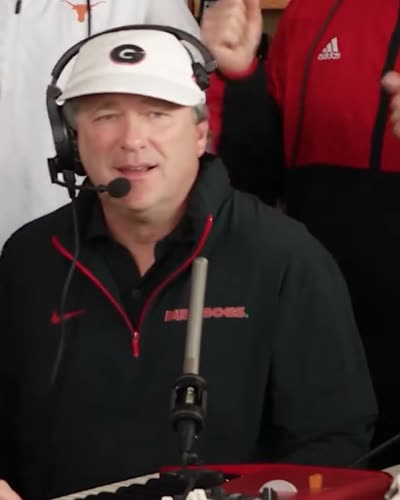
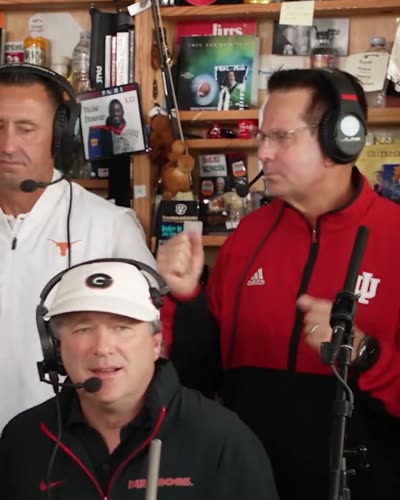
The band, the moves and the original song stay exactly as recorded. Only the lead singer changes.
13 s · original song · 9:16 · 720p · from $9.90 · no subscription
Choose a photo first. You will sign in before it is saved.
Select your photo first. Sign in only when you are ready to save it, view credits or buy a pack.
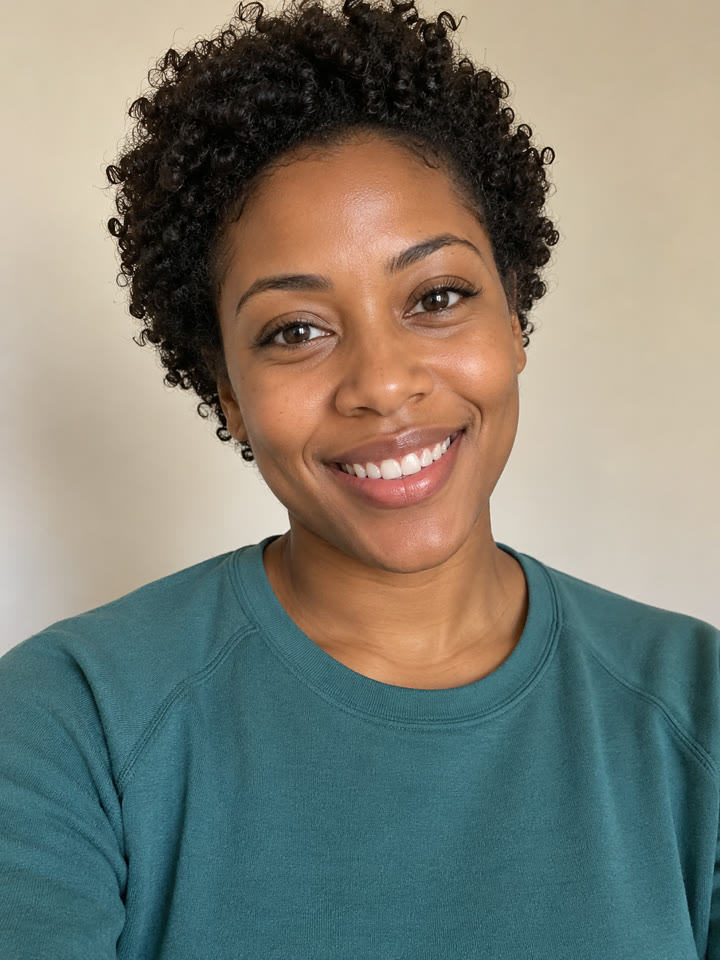
Example made from an AI-generated photo of a fictional adult.
Thirteen seconds from the Outstanding performance, with your lead singer in both close-ups. These frames are from the AI demo above.
 0:07
0:07 0:03
0:03 0:11
0:11You do not need a prompt, source video or editing timeline. Tiny Desk AI uses one authorized photo and a fixed private performance reference.
Choose one photo of a consenting adult. Keep the face visible and avoid group shots, heavy blur, masks, sunglasses and very small subjects.
Review the photo, confirm permission and check the credit requirement. Start generation only when you are ready; it renders in the background.
Watch the private result and check the face, clothing, motion and audio. Download the MP4 when you are happy, or delete it from your account.
Compare the example photo with the AI-generated result. Every AI result can vary: faces, clothing, hands and background details may change, so always review the complete video before sharing it.
The AI keeps the moves, the timing and the band. Your photo decides the face, so a better photo gives the model more useful detail. No photo can guarantee perfect likeness.
 Callback ✓
 Callback ✓
 Callback ✓
 Callback ✓
Start with one authorized adult photo. You do not need five cast photos, a green screen or a source clip.
The moves, cuts and timing come from a fixed performance. You do not write a prompt, upload a video or edit a timeline.
Your video stays private in your account. Download the MP4 or delete it whenever you like.
People often search for an Outstanding Tiny Desk AI template or a Tiny Desk CapCut template. A template cannot put a new face into the performance; Tiny Desk AI does that part for you.
| Method | What you provide | What you control | Editing needed |
|---|---|---|---|
| Tiny Desk AI | One authorized adult photo | The photo and when to start | None |
| CapCut or social template | The clips the template asks for | Template options only | Usually, in a third-party app |
| Manual video edit | Source footage, a face-swap tool and audio | Every cut and effect | Yes, a lot |
Each video uses 10 credits. Credit packs are one-time purchases, not subscriptions. If a task fails, its reserved credits come back automatically.
$9.90
1 video · 10 credits
$19.90
3 videos · 30 credits · $6.63 each
$29.90
5 videos · 50 credits · $5.98 each
One-time packs, no subscription; credits do not expire. A confirmed failed generation returns its reserved credits. A wholly unused pack can be refunded within seven days.
“Tiny Desk AI” commonly refers to AI-made parody videos that place a person or group into an intimate desk-concert setting. The “Outstanding” variation is the meme format inspired by Charlie Wilson’s desk performance and the sports and fan edits that followed.
On this site, Tiny Desk AI means a one-photo AI video workflow. It is not an official NPR concert, a music streaming page, the unrelated TinyDesk desktop app, or a downloadable CapCut template.
Tiny Desk AI is an independent one-photo AI video tool that creates a private, vertical desk-concert parody from an authorized adult photo and a fixed performance reference.
Choose one clear adult photo you have permission to use, confirm the photo and credits, start generation, then review the private result before downloading or sharing it.
Yes. The current Solo workflow uses one authorized adult photo for the lead singer.
The current Solo format is 13 seconds, 720p and vertical 9:16.
Yes. The video keeps the original performance audio. Your voice is not cloned.
You can review the product information and the example without starting a paid task. Creating a video uses a one-time credit pack.
No. The workflow uses a fixed performance reference, so you do not need a timeline editor, source video or written prompt.
You do not need one. The meme is an AI face swap, so a template alone cannot put a new person in the performance. Tiny Desk AI does it from one photo; add captions in TikTok or CapCut afterwards if you like.
“Outstanding” by The Gap Band, from the 1982 album Gap Band IV. The clip comes from the end of Charlie Wilson’s NPR Tiny Desk concert, published in June 2023.
Yes, if each person in the photo is an adult who agreed to it. Do not upload celebrities, public figures or anyone without permission, and never use the video to mislead or advertise.
It is an AI character-replacement workflow, not a live camera face-swap app. Results can contain visual artifacts and should be reviewed before sharing.
Not in the current Solo version. It supports one authorized adult photo.
Use one sharp, well-lit photo of a consenting adult with a visible face. Avoid group photos, heavy blur, masks and sunglasses.
Successful results support private playback, MP4 download and deletion from your account.
Your photo is stored privately and sent to the video provider only after you start generation. Photo drafts are deleted after 24 hours. See the Privacy Policy for details.
No. Tiny Desk AI is an independent parody tool and is not affiliated with or endorsed by NPR, Tiny Desk, Charlie Wilson, The Gap Band, or the artists and organizations referenced by the trend.
No. This is a browser-based photo-to-video service. It does not provide the unrelated TinyDesk desktop app, source code or a software download.
Choose one authorized adult photo, review the credit requirement and start generation only when you are ready. Your finished video stays private to your account until you download or delete it.